Kimola vs. Dovetail
See why marketing and research professionals from 90+ countries choose Kimola over Dovetail as a customer feedback analysis tool.





















3,000+ growth-obsessed teams from 90+ countries
create 5 reports in every 30 minutes at Kimola.
Compare Kimola to Dovetail
Kimola provides statistically backed theme analysis, showing the content itself, how it’s labeled, and detailed metrics for both themes and sentiment. Dovetail, on the other hand, only generates text summaries and suggested actions without revealing statistics or which clusters are actually larger.
-
KimolaDovetail
-
Get a clear, data-driven understanding of your feedback. See how themes and sentiments are distributed, which clusters are larger, and how each piece of content is labeled—so you can make decisions based on real numbers, not just summaries.
-
Multi-label classification is an analysis methodology that assigns multiple labels to each review, capturing every relevant aspect mentioned. This approach reveals all the topics a customer refers to, providing a deeper and more accurate understanding of their experience.
-
Scraping feedback from multiple sources—such as e-commerce sites, review platforms, and mobile app stores—saves valuable time and makes the research process far more efficient and effective. Kimola offers scraping from e-comm platforms while Dovetail doesn't.
★★★★★★★★☆☆ -
Analysis Accuracy
Kimola shows the raw content and how they are labeled but Dovetail only shows AI analysis with summary. Since there are no statistics given for analysis, the accuracy of Dovetail can not be measured.
★★★★★★★☆☆☆ -
Kimola is designed for everyone—from small teams to large enterprises with both online plans and customized enterprise plans. View enterprise plans in this section.
Starting from $900/monthlyStarting from $4,000/monthly
 No AI Training
Kimola needs no AI training to classify customer feedback. It automatically generates clusters based on the context rather than using pre-defined labels.
 No Data Hustle
Scraping reviews from leading platforms like Amazon, Google Business, Trustpilot, Tripadvisor, Google Play, and the App Store is a smooth process in Kimola.
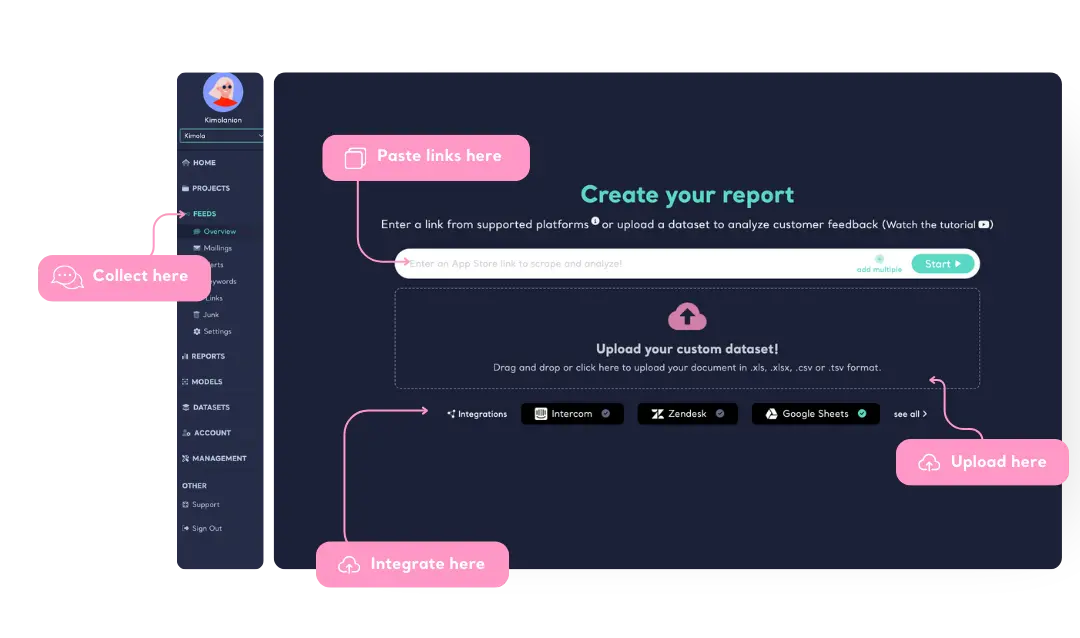
Collect, Upload or Integrate User Feedback
Kimola tracks conversations across social media, news sites, blogs, and forums, helping you stay informed about discussions around your product. Users can also enter links from platforms like Trustpilot, Google Play, and the App Store to continuously monitor user feedback.
For those already collecting user feedback, Kimola allows direct dataset uploads in Excel, CSV, or TSV formats to create structured qualitative research reports. Additionally, users can integrate their Google Sheets, Zendesk, or Intercom accounts, seamlessly connecting existing user interactions to Kimola for in-depth analysis.
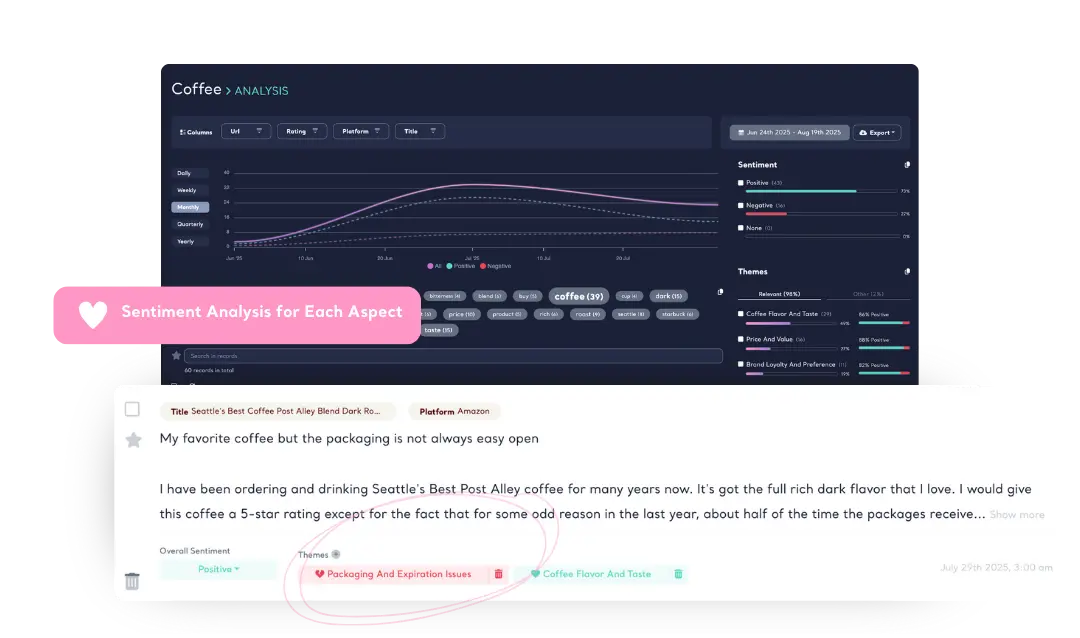
Sentiment and Themes with Aspect-Based Accuracy
Kimola assigns sentiment for each theme in a single user feedback, ensuring you capture every detail—what users like, dislike, and why. Even when a user mentions different topics within the same review, Kimola successfully breaks down feedback into multiple aspects and accurately assigns sentiment to each, so no insight is lost!
Learn about Aspect-based Sentiment Analysis
Kimola's Dynamic Classification™ technology understands context and generates relevant theme clusters without relying on pre-defined categories. It adapts to any dataset, eliminating the need for manual labeling or data annotation. This ensures precise categorization of unstructured feedback from online reviews, surveys, and social media—without human error.
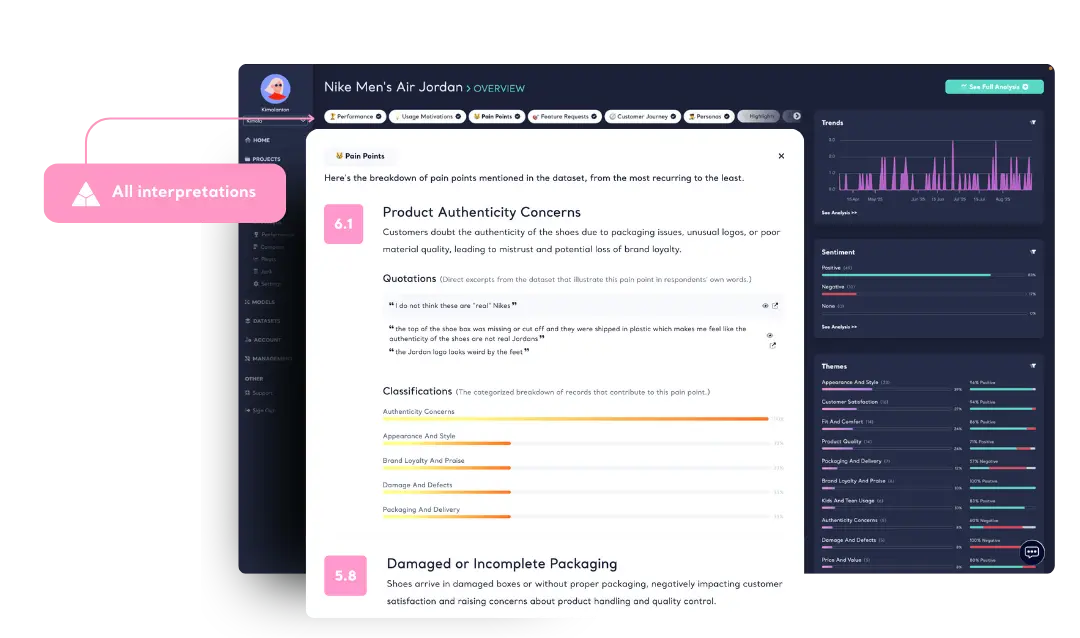
Summaries, Pain Points, Motivations and more
Kimola analyzes large-scale feedback and generates structured executive summaries around key topics and themes. Unlike generic AI-generated text, Kimola offers summaries with sub-sections and with sentiment and content classifications, which provides clarity, focus, and actionable insights.
Learn more about Executive Summary
Kimola analyzes user feedback to reveal what drives purchases, what causes frustration, and how your product is positioned in the market. AI-driven analysis detects patterns across any number of reviews, highlighting key motivations, recurring pain points, and competitive advantages.
Kimola analyzes customer feedback through a four-stage journey framework—Discovery, Purchase Experience, Usage & Support, and Loyalty & Advocacy. By applying its proprietary scoring algorithm, Kimola classifies feedback into these stages to reveal how customers perceive each step, measure satisfaction levels, and pinpoint the critical moments that define brand relationships.
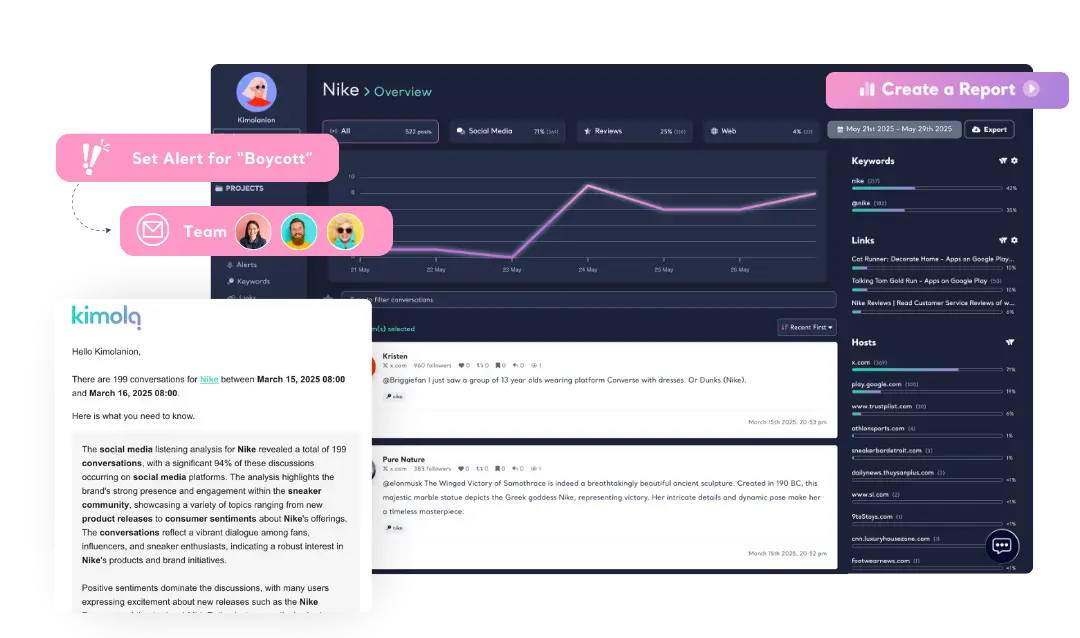
Get Automated Reports & Alerts
Stay informed without the hassle. Receive automated reports summarizing mentions in their original language. Set up alerts based on keywords, influence levels, or sudden volume spikes, ensuring you never miss a critical mention.
Analyze Multilingual Datasets
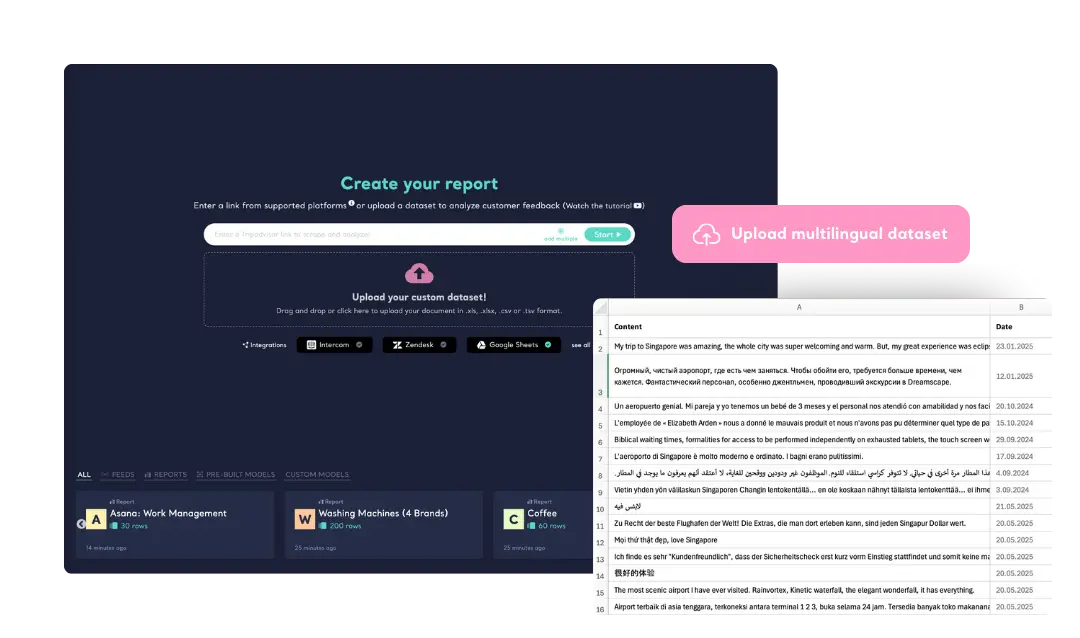
Kimola seamlessly analyzes datasets containing customer feedback in multiple languages. No need to segment feedback based on language—simply upload your dataset, and our AI processes all entries together, delivering insights in a unified format. This allows for a more comprehensive understanding of customer sentiment across diverse markets.
-
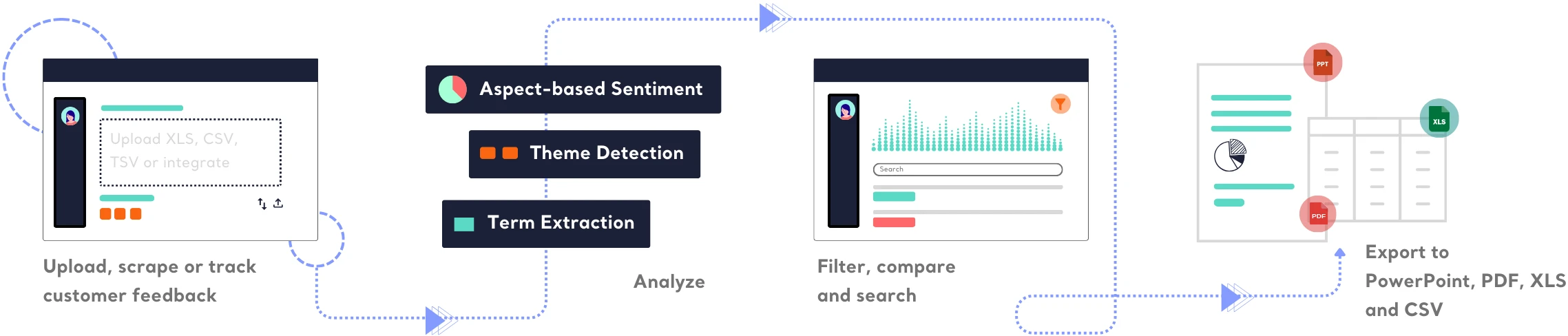
Track & Analyze
Customer Feedback -
TRACK
Collect and centralize feedback.
ANALYZEMake sense of large-scale feedback.
INSIGHTSTurn data into meaningful insights.
Find out how Kimola can improve your feedback analysis process.
-
![Kimola for Product Feedback Analysis]() Product Feedback Analysis
Product Feedback Analysis
Uncover customer needs, likes, and dislikes from product reviews and feedback.
-
![Kimola for E-commerce Feedback Analysis]() E-commerce Feedback Analysis
E-commerce Feedback Analysis
Analyze customer reviews and ratings to optimize online shopping experiences.
-
![Kimola for Social Feedback Analysis]() Social Feedback Analysis
Social Feedback Analysis
Extract insights from social media conversations and online discussions.



-
![Kimola for Open-ended Survey Analysis]() Open-ended Survey Analysis
Open-ended Survey Analysis
Make sense of free-text survey responses with AI-powered analysis.
-
![Kimola for Conversational Analysis]() Chatbot and Call Center Conversational Analysis
Chatbot and Call Center Conversational Analysis
Understand customer sentiment and concerns from chat and call transcripts.
-
![Kimola for Employee Feedback Analysis]() Employee Feedback Analysis
Employee Feedback Analysis
Identify workplace trends and employee sentiment from internal feedback and reviews.



Plans vary by query limits, data tracking, analysis and support options.
- 150 queries/month
-
- Track Mentions
- Track Reviews
- Custom AI Models
- 5 GPT Credits
-
- TRACK
-
- Automated Reports & Alerts
- Integrations
- Scrape Customer Feedback
-
- ANALYZE
-
- Aspect-based Sentiment
- Topic & Theme Detection
- Pretrained AI Models
- 30+ Language Support
- Excel, PDF and PowerPoint Export
-
- INSIGHTS
-
- Executive Summary
- Personas
- Pain Points
- Usage Motivations
- 10+ others
-
- ADVANCED
-
- API
- Role-based Access
- User Logs
-
- SUPPORT
-
- Support Tickets (5 week-days SLA)
- Onboarding
- Account Manager
-
- LEGAL
-
- Custom Agreement
-
Basic$ 49 /monthbilled monthly
- 3,000 queries/month
-
- 3 keywords
- 5 links
- 1 Custom AI Model
- 15 GPT Credits
-
- TRACK
-
- Automated Reports & Alerts
- Integrations
- Scrape Customer Feedback
-
- ANALYZE
-
- Aspect-based Sentiment
- Topic & Theme Detection
- Pretrained AI Models
- 30+ Language Support
- Excel, PDF and PowerPoint Export
-
- INSIGHTS
-
- Executive Summary
- Personas
- Pain Points
- Usage Motivations
- 10+ others
-
- ADVANCED
-
- API
- Role-based Access
- User Logs
-
- SUPPORT
-
- Support Tickets (72-hour SLA)
- Onboarding
- Account Manager
-
- LEGAL
-
- Custom Agreement
-
Standard$ 179 /monthbilled monthly
- 12,000 queries/month
-
- 10 keywords
- 15 links
- 3 Custom AI Model
- 30 GPT Credits
-
- TRACK
-
- Automated Reports & Alerts
- Integrations
- Scrape Customer Feedback
-
- ANALYZE
-
- Aspect-based Sentiment
- Topic & Theme Detection
- Pretrained AI Models
- 30+ Language Support
- Excel, PDF and PowerPoint Export
-
- INSIGHTS
-
- Executive Summary
- Personas
- Pain Points
- Usage Motivations
- 10+ others
-
- ADVANCED
-
- API
- Role-based Access
- User Logs
-
- SUPPORT
-
- Support Tickets (48-hour SLA)
- 1 hour onboarding/month
- Account Manager
-
- LEGAL
-
- Custom Agreement
-
Business$ 359 /monthbilled monthly
- 30,000 queries/month
-
- 15 keywords
- 30 links
- 5 Custom AI Model
- 50 GPT Credits
-
- TRACK
-
- Automated Reports & Alerts
- Integrations
- Scrape Customer Feedback
-
- ANALYZE
-
- Aspect-based Sentiment
- Topic & Theme Detection
- Pretrained AI Models
- 30+ Language Support
- Excel, PDF and PowerPoint Export
-
- INSIGHTS
-
- Executive Summary
- Personas
- Pain Points
- Usage Motivations
- 10+ others
-
- ADVANCED
-
- API
- Role-based Access
- User Logs
-
- SUPPORT
-
- Support Tickets (48-hour SLA)
- 2 hours onboarding/month
- Account Manager
-
- LEGAL
-
- Custom Agreement
Enterprise plans include custom contracts, flexible payment options, a dedicated account manager, role-based access controls, and full API usage. Contact us to learn how Kimola can support your organization at scale.
Frequently Asked Questions
About Dovetail
-
What’s the main difference between Kimola and Dovetail?
Kimola provides statistically backed theme and sentiment analysis, while Dovetail focuses on text-based summaries without showing the underlying data distribution.
-
Does Dovetail show the size of clusters or theme frequencies?
No. Dovetail generates summaries and suggested actions but doesn’t reveal which clusters are bigger or provide numerical insights. Kimola, on the other hand, displays full statistics for themes and sentiments.
-
Can I see how each piece of feedback is labeled on Dovetail and Kimola?
Yes with Kimola — every item is shown with its assigned theme and sentiment. Dovetail does not display labeled content or classification details.
-
Which tool is better for data-heavy or high-volume feedback? Dovetail or Kimola?
Kimola is better suited for high-volume datasets because it offers automated clustering, statistics, and a clear visual understanding of data distribution. Dovetail is stronger for manual, qualitative, researcher-driven workflows.
-
Which tool provides more transparency in the analysis process? Dovetail or Kimola?
Kimola. It shows the content, the labels, the stats, and the model outputs. Dovetail summarizes the data but doesn’t expose the analytical steps or numerical foundations behind those summaries.
-
Is Dovetail or Kimola better for continuous feedback analysis, like reviews or support tickets?
Kimola. It's built for ongoing, repeatable analysis across channels like surveys, reviews, and tickets. Dovetail is better when the primary source is interviews or user research projects.
-
Which tool provides more ready-to-use insights, Dovetail or Kimola?
Kimola provides automated insights instantly. Dovetail provides rich insights but mostly after manual synthesis.
Turn customer feedback into structured market research in 30+ languages—no AI training needed.
Create a Free Account No credit card · No commitment